Coding Agent Harness
编码代理的核心产品不是模型,而是负责上下文投影、工具合约、文件真值和权限控制的运行时框架(Harness)。
The model gets the spotlight;
The harness decides what actually happens.
01. The Harness Is The Product
Why the most important part of a coding agent is often the least glamorous part.
Every coding-agent discussion eventually starts with the model.
Which model? How much context? How good is it at code?
Those questions matter. They are just not the first question I now ask.
The first question should be:
What does the harness own?
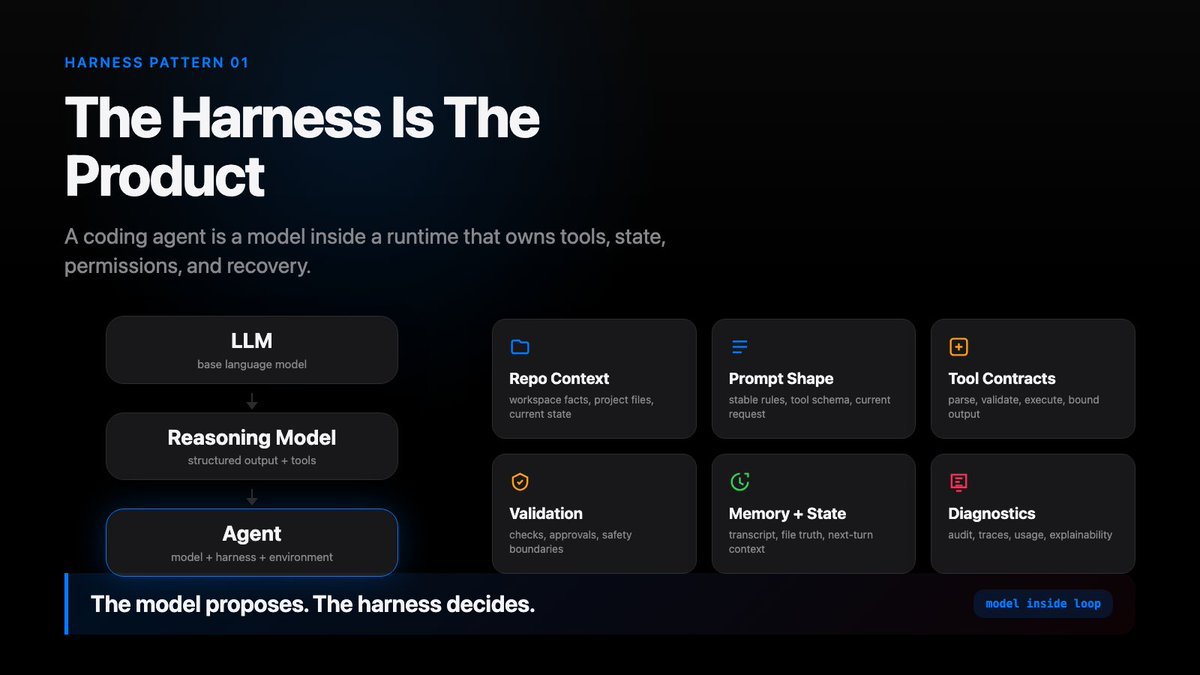
A base LLM predicts text.
A reasoning model can follow structure, emit tool calls, and work inside a protocol.
A coding agent goes further. It puts the model inside a runtime. That runtime can inspect a real repository, request tools, edit files, run checks, remember what happened, and continue across multiple turns.
That runtime is the harness.
And for a coding agent, the harness is the product.
The Naive Version
A mini coding agent often begins with a loop like this:
user request -> big prompt -> model response -> run whatever tool it asked for -> paste the result back into the prompt -> repeat
The loop looks simple because validation, permissions, result limits, and state updates are hidden.
It is a useful sketch. It is not yet a real coding agent.
Very quickly, questions appear:
- What if the model edits a file it never read?
- What if a shell command touches files outside the workspace?
- What if a tool returns 50,000 lines of output?
- What if a file changed on disk while the transcript still contains the old read?
- What if a tool result no longer matches the tool call that produced it?
The missing part is not a better prompt. The missing part is the harness.
What The Harness Owns
The model can propose. The harness decides what can become a real-world effect.
The naive interface is:
model(prompt) -> answer
But a useful coding agent needs more than an answer. It needs tool lifecycle, permission decisions, transcript records, file truth, and next-turn state.
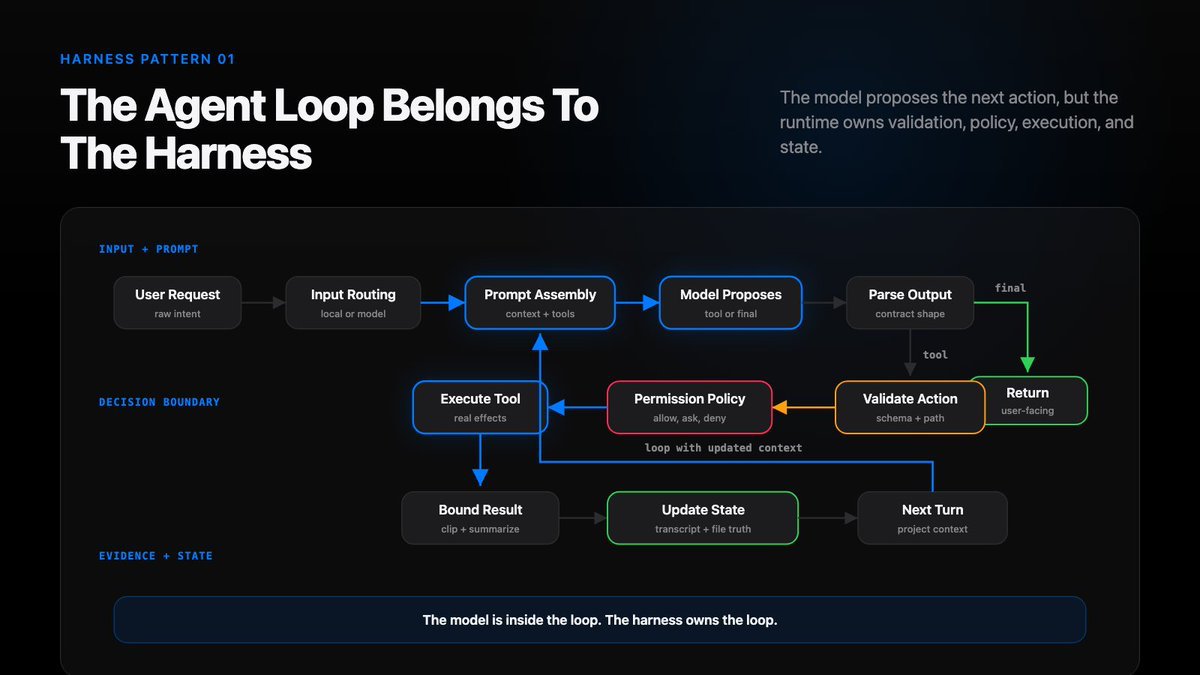
The harness-owned path is closer to:
input routing -> message design -> prompt assembly -> model output -> parser -> tool validation -> permission policy -> execution -> bounded result -> transcript + state update -> next turn
Every arrow is a boundary.
Every arrow is a place where the harness can protect the user. It is also a place where it can quietly lose control.
Six Things A Coding-Agent Harness Must Do
I compress the coding-agent harness into six core responsibilities.
1. Live repo context
An agent should not begin from an empty prompt. It needs the workspace, current files, project docs, and a safe view of the real repo state.
2. Prompt shape
Context quality often looks like model quality. A stable prefix, clear tool contracts, the current request, and controlled history can change behavior more than swapping models.
3. Structured tools
Tools are not helper functions. They are contracts between a model proposal and real side effects.
The harness parses arguments, validates paths, checks policy, executes actions, clips output, and records what happened.
4. Context reduction
If the harness blindly appends everything, the model will eventually see too much, too little, or the wrong thing.
Good context is a projection, not an ever-growing blob.
5. Transcripts and memory
The transcript answers: what happened?
Working state answers: what matters now?
Those are different jobs. They should not be treated as the same object.
6. Delegation
Subagents are not magic parallelism. They are bounded workers with scoped tools, isolated state, and distilled results.
Delegation becomes useful when it is designed as a controlled context boundary.
The Main Loop
A coding agent is an observe-act loop. The valuable part happens between observe and act.
The model is inside the loop:
while tool_steps < max_steps: prompt = build_prompt( workspace=workspace_state, tools=tool_schemas, memory=session_memory, file_state=file_state, history=projected_history, ) output = model.complete(prompt) action = parse_model_output(output) if action.kind == “final”: return action.text result = validate_authorize_execute_record(action) projected_history = update_context(result)
The model is inside the loop.
The harness owns the loop.
That distinction matters.
A Concrete Example
Suppose the model emits a tool call:
write_file( path=“src/config.py”, content=”…” )
Before that write becomes a real side effect, the harness still has to check path safety, baseline freshness, approval, and state updates.
The model made a proposal. The harness now has to answer:
- Is src/config.py inside the workspace?
- Can this path escape through a symlink?
- Is this a new file or an overwrite?
- Did the model recently read the existing file?
- Is the known file baseline stale?
- Does this write require human approval?
- Should the result include a diff summary?
- Should validation run afterward?
- How much output should enter the next prompt?
- Which state needs to update so the next turn is not stale?
These decisions should not be left to model improvisation.
A prompt can describe expected behavior. The harness enforces the boundary.
The Product Lesson
Once you start seeing the harness, many coding-agent failures become easier to diagnose.
- If the agent repeats itself, inspect the loop and retry policy.
- If it edits stale code, inspect file-state baselines.
- If it gets worse over time, inspect context projection.
- If it runs something surprising, inspect permission policy.
- If it cannot recover from tool errors, inspect tool result objects.
- If it cannot explain what happened, inspect traces, audit, and doctor surfaces.
The model is important. Model quality is one layer.
The real agent experience comes from the full stack around the model:
- model
- repo context
- prompt structure
- tool contracts
- validation
- permissions
- transcript
- file state
- diagnostics
Anything that must be reliable belongs in the harness.
That is why “the harness is the product” is more than a slogan.
It is an engineering rule:
Anything that must be reliable belongs in the harness.
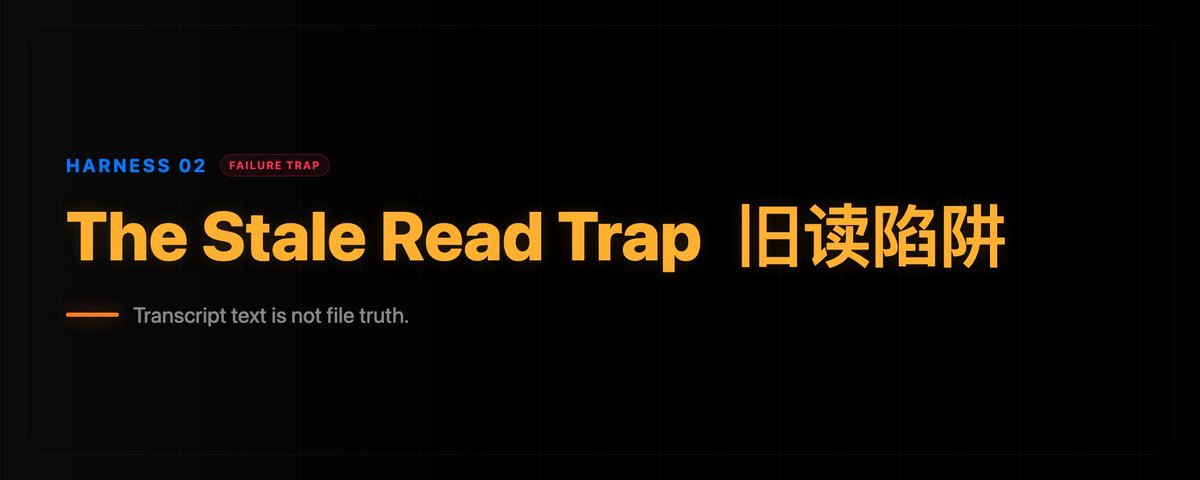
02. The Stale Read Trap
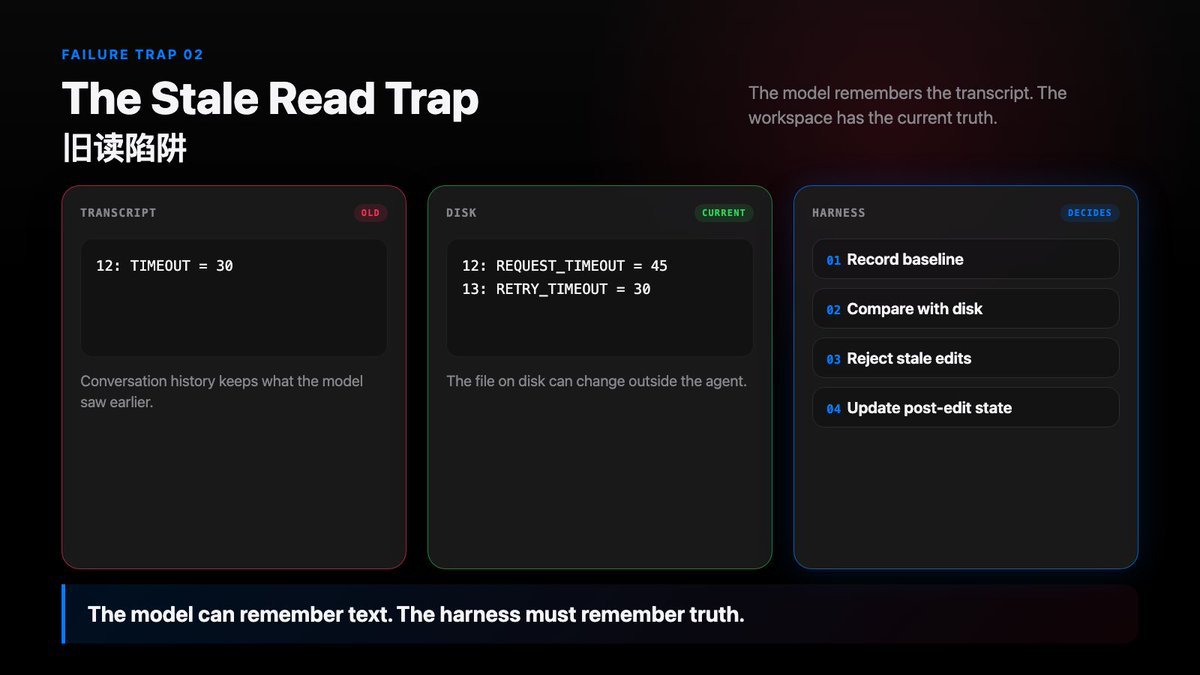
The model remembers the transcript. The harness must remember truth.
What is the stale read trap?
The most dangerous coding-agent bug often looks ordinary.
The agent reads a file. The user changes that file. The model remembers the file content from the transcript, but the disk has already moved on.
Then the agent edits the old version.
No dramatic error. No obvious hallucination. Just a model confidently working from stale evidence.
That is the stale read trap.
Remember this:
Transcript text is not file truth.
If a coding agent cannot tell whether the model’s remembered file content still matches disk, it will eventually patch yesterday’s code.
The Failure
Imagine this sequence:
turn 1 read_file(“src/config.py”) -> transcript now contains the file content outside the agent formatter, user, or git checkout changes src/config.py turn 2 model uses the old transcript text patch_file( path=“src/config.py”, old=“TIMEOUT = 30”, new=“TIMEOUT = 60” )
The problem is not read_file.
The problem is that after the disk changed, the agent still trusted the old read.
From the model’s point of view, the file content is right there in the conversation. But the conversation is history. The workspace is current fact.
The Naive Design
A small agent often treats tool output as ordinary transcript text:
User: change the timeout Tool: here is src/config.py Assistant: I will patch line 12 Tool: patch succeeded
Plain transcript text cannot detect external file changes.
This works only while nothing outside the transcript changes. But the transcript and the disk are not the same state.
transcript says: 12: TIMEOUT = 30 disk now says: 12: REQUEST_TIMEOUT = 45 13: RETRY_TIMEOUT = 30
If transcript and disk disagree, the harness should believe disk.
If the harness only appends text, the model can act inside a world that no longer exists.
What The Harness Needs To Know
The harness needs a separate record of file truth. It cannot only remember that “the model read something.”
It needs file-state records:
path: src/config.py read range: whole file or lines 1-80 baseline hash: abc123… mtime / size: last known disk fingerprint content baseline: bounded text the model saw source: read_file, agent_change, external_change status: fresh, changed, stale, partial, truncated
Transcript is chronological. File content is stateful.
The transcript answers: what happened in the conversation?
File state answers: which file content can the model still trust right now?
The Harness Contract
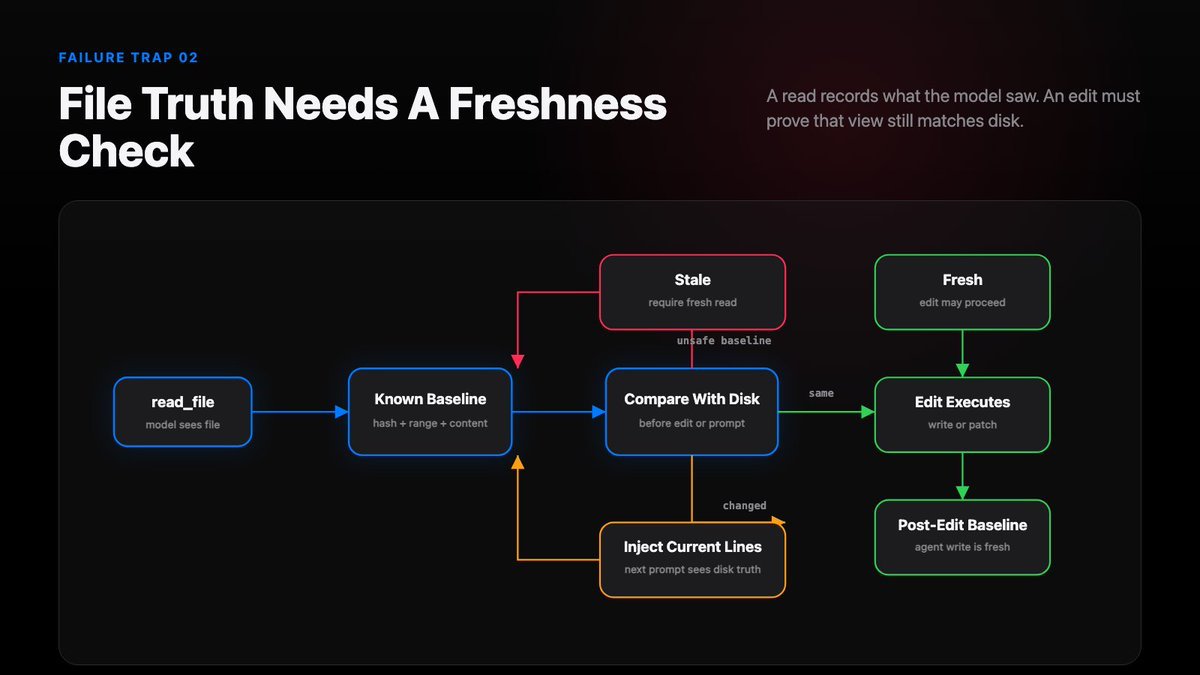
A mature harness treats read_file as a contract:
read_file(path) -> record baseline -> attach bounded content to transcript -> remember what the model saw before edit(path) -> compare baseline with disk -> reject stale / partial / missing / changed -> require fresh read or inject current changed lines after successful edit(path) -> record post-edit baseline -> mark the agent’s own write as fresh
Now file read is not just a convenience. It becomes a safety mechanism.
The model can still propose an edit. The harness decides whether that proposal is based on fresh file truth.
Partial Reads Are Partial
There is another version of the stale read trap: partial reads.
The model reads lines 100-140, then tries to rewrite the whole file.
That should make the harness nervous. A range read can answer a question, but it should not automatically authorize a high-risk edit.
read_file(“server.py”, start=100, end=140) -> useful context -> partial baseline -> not enough for whole-file overwrite
A local slice can answer a local question without authorizing a risky global edit.
A useful rule:
Existing-file edits should require a fresh full-file baseline, unless the edit tool has a stricter exact-context contract.
That prevents the model from guessing the rest of a file from one local slice.
What The Harness Should Track
When read_file runs, track:
- workspace-relative path
- line range and total line count
- whether the read covered the full file
- modification time, size, and content fingerprint
- bounded baseline text
- state source
After a successful write_file or patch_file, record the post-edit content as the new known baseline.
When building the next prompt, lazily refresh tracked files:
- unchanged content stays fresh
- timestamp-only change with identical content refreshes quietly
- external disk edit becomes a changed-line snippet
- deleted or oversized changed file becomes a stale warning
- fresh read_file clears stale or external-change state
Why This Changes Agent Behavior
Once the harness has file state, agent behavior changes.
If the file did not change, repeated reads can collapse into a summary instead of flooding context.
If the file changed outside the agent, the next prompt can show current changed lines instead of old transcript content.
If the model only read a slice, an edit can be rejected before it breaks the file.
After the agent writes, the post-edit content can become the fresh baseline.
After session resume, the harness can restore not just text, but what the agent is allowed to trust.
The model can remember text. The harness must remember truth.
03. Tools Are Contracts, Not Functions
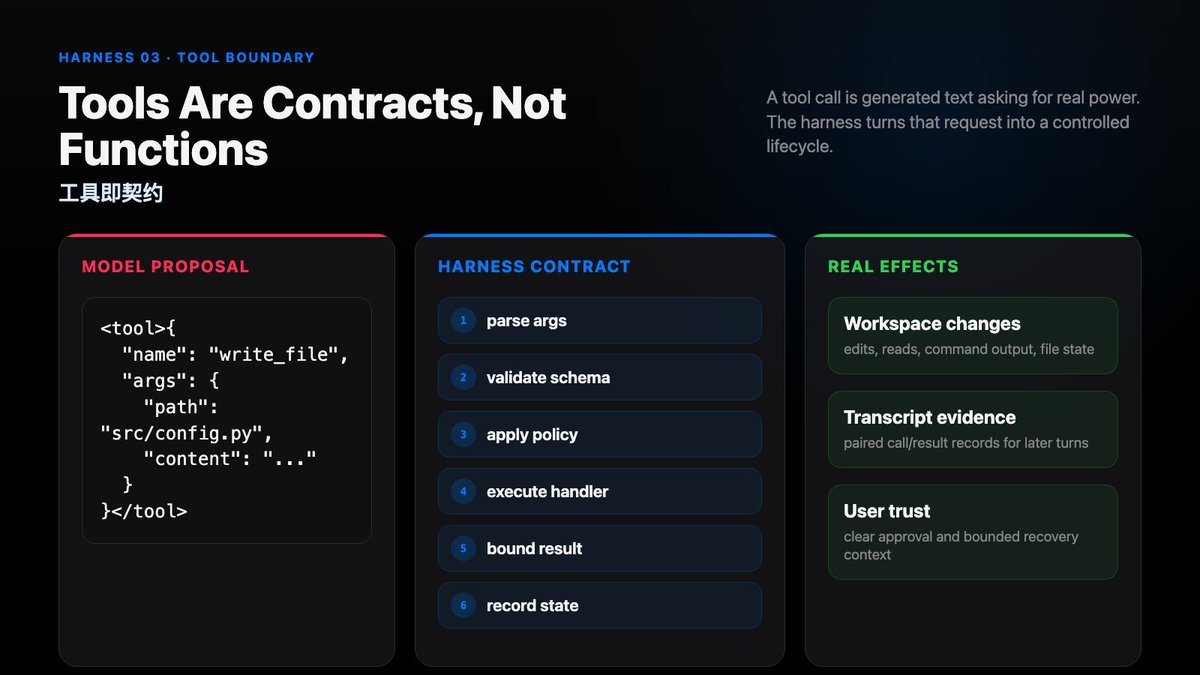
If a coding agent has a world, every tool call is generated text asking to change that world’s state.
A tool call can look deceptively simple.
The model emits JSON. The harness parses it. A local function runs. The result goes back into the next prompt.
That is the tiny-agent version.
But in a coding agent, a tool call is not just a function call.
The tool call comes from generated text. It is asking for access to the workspace, the shell, the network, the transcript, or another agent.
That difference changes the agent’s state and environment.
The model can ask. The harness decides.
The Proposal and Contract
Imagine the model emits:
<tool>{ “name”: “write_file”, “args”: { “path”: “src/config.py”, “content”: ”…” } }</tool>
Valid-looking JSON is still only a request for power.
It is structured. It is still a proposal.
The model producing legal JSON does not automatically grant write access.
The harness still needs to answer:
- Does this tool exist?
- Do the args match the schema?
- Is the path inside the workspace?
- Is this create, overwrite, or patch?
- Did the model recently read the existing file?
- Is the file-state baseline fresh?
- Does this action require approval?
- What should the human see before approval?
- How much result output can safely enter context?
- Which transcript and state updates are needed afterward?
That list is the tool contract.
The Naive Design
The naive design treats tools as a function map:
tool = tools[model_json[“name”]] result = tool(**model_json[“args”]) history.append(result)
One short line can hide parsing, policy, limits, and state updates.
The code is short, so it looks clean. It also compresses too much responsibility into one line.
Parsing, schema validation, path safety, permission policy, sandbox choice, execution, output clipping, transcript recording, and state updates are all hidden inside tool(…).
That is fine for a demo. It is not enough for an agent that can modify a real repo.
In ordinary software, a function call is an implementation detail.
In a coding agent, a tool call is where generated text requests permission to change the real world.
What A Tool Contract Contains
A useful tool contract is more than a name and a handler.
It should describe:
name: write_file args schema: path, content risk: workspace_write path policy: must stay inside workspace state requirement: existing file needs fresh baseline approval: required for writes approval summary: path + operation + size execution: atomic write or exact patch result budget: bounded diff / chars / lines state update: record post-edit baseline transcript record: paired call and result
Some fields are for the model.
Some fields belong only to the harness.
The model needs enough information to make the request correctly. The harness needs enough metadata to judge it correctly.
The Lifecycle
A minimal lifecycle looks like this:
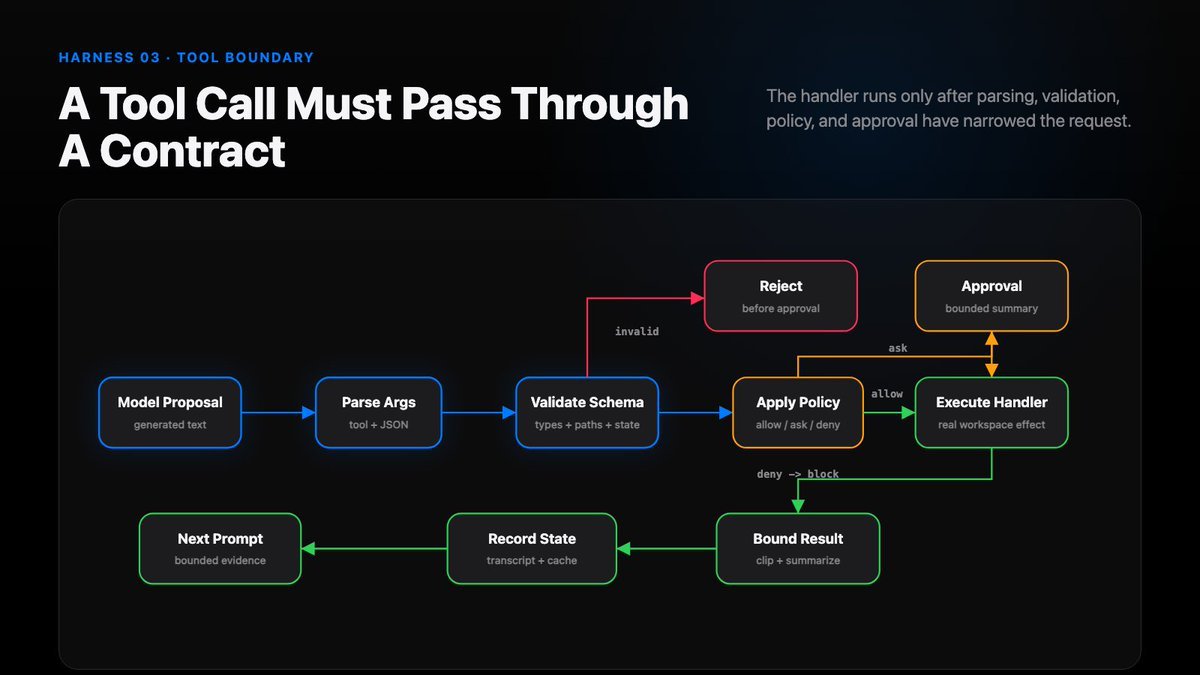
Each step catches a different class of problem.
- parse catches malformed output
- schema validation catches missing fields and wrong types
- path validation catches workspace escape
- policy handles risk, approval, sandbox, or denial
- execution runs the real handler
- bounding prevents one command or file read from drowning the next prompt
- recording lets the next turn recover and audit what happened
“Just call the function” is the wrong mental model. The function is only a small part of the lifecycle.
Validate Before Approval
Validation should happen before approval.
- If patch_file points outside the workspace, reject first.
- If old_text is missing or ambiguous, reject first.
- If a tool call repeats the previous failed request, reject or retry first.
- If a write targets an existing file but lacks a fresh baseline, reject first.
Approval is a product surface.
The user should not be asked to approve a request that is already invalid.
When approval is needed, the summary should stay bounded:
tool: write_file path: src/config.py operation: update existing file content: 84 lines, 2410 chars risk: workspace_write requires: human approval
Invalid requests should fail before a human is asked to decide.
Bounded Results Are Part Of Safety
Tool output becomes context.
Context changes agent behavior.
- If search returns 10,000 matches, the model is not wiser.
- If run_shell prints a huge log, the next turn may lose the actual user request.
- If read_file repeats the same unchanged file every turn, useful context gets pushed out.
Tool contracts need result limits:
stdout: clipped stderr: clipped large files: offset + limit search: max matches binary files: metadata only diff: summarized
Bounding output is not just UX polish. It is part of safety.
04. The Agent’s Toolkit: ”/”
The slash is where a coding agent stops being only a prompt box.
Every coding-agent UI begins with a simple idea:
Type a request. Send it to the model. Get work back.
That is the prompt-box view of an agent.
It works for normal requests:
fix the failing tests explain this module add a config option
But a product-grade coding agent has another class of input:
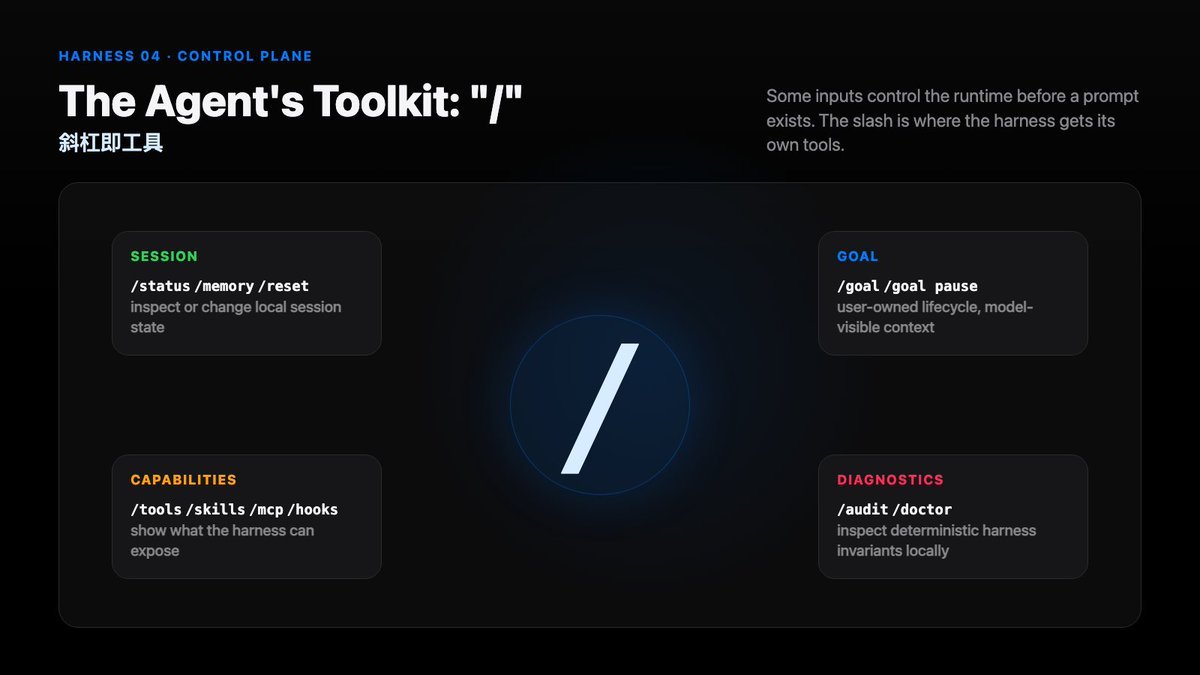
/status /tools /reset /goal pause /audit
These inputs should not be sent to the model as ordinary requests.
They are user tools for controlling the agent runtime.
Do not send control-plane intent to the model as ordinary chat.
The Naive Prompt Box
A tiny agent often sends every text input through one path.
That is simple. It also creates bad product behavior.
- The user types /status; the model may invent a status.
- The user types /reset; the model may discuss reset without clearing session state.
- The user types /goal pause; the model may treat it as an instruction inside the task.
- The user mistypes /statsu; the model may guess instead of returning command help.
The problem happens before model quality.
The harness did not route the input correctly.
Slash Commands Are User Tools
Article 03 said model tools are contracts.
Slash commands are another class of tool. They belong to the user and the harness.
They can inspect, steer, reset, pause, diagnose, and configure runtime before any model call exists.
Command families are often simple:
- some commands produce local output
- some commands modify session state
- some commands expose harness metadata
- some commands prepare context for the next model turn
They all need to be routed before prompt construction.
The keyword is:
Input Router
The Input Router
A useful coding-agent harness has two parser boundaries.
The first handles user input.
The second handles model output.
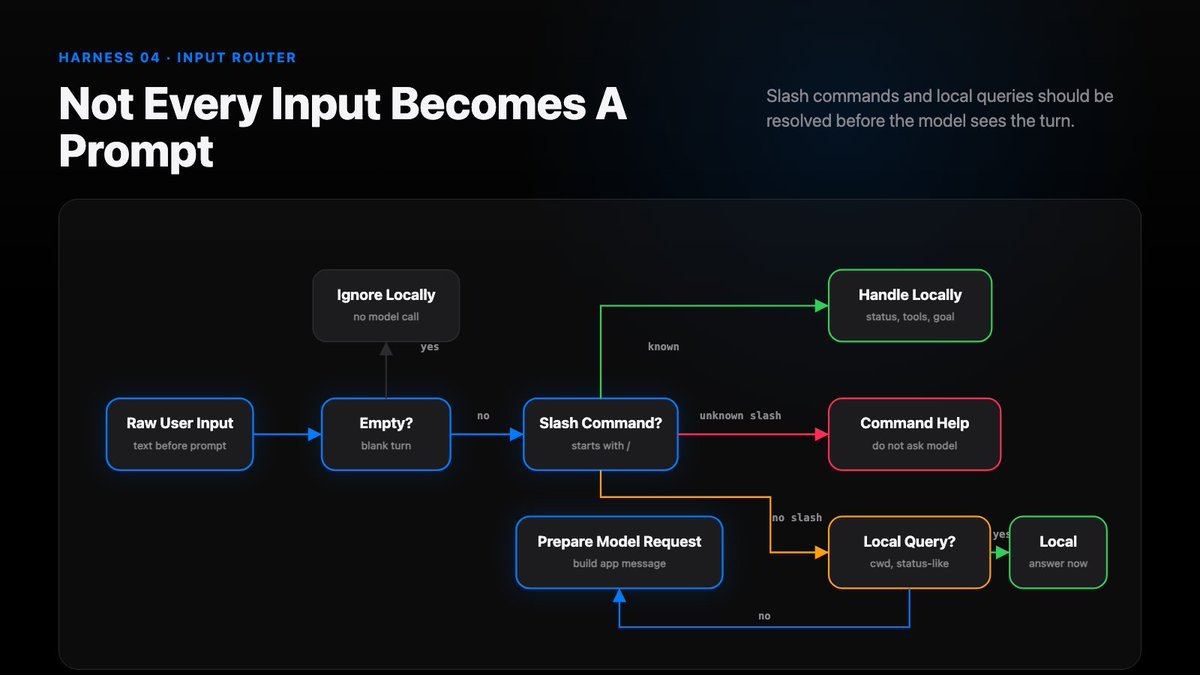
The input router should decide:
- ignore empty input
- handle known slash commands locally
- reject unknown slash commands with help
- answer local runtime questions locally
- send ordinary work requests to the model
Only the last path should enter agent.ask().
The prompt box is no longer the only entrance.
The harness has its own control surface.
Not every input becomes a prompt.
The Special Case: /goal
/goal is interesting because it sits between user control and model work.
goal is explicit session state
The user-facing command controls lifecycle:
/goal <objective> /goal pause /goal resume /goal complete /goal clear
The model can see goal context in the prompt.
But the model should not freely create, pause, resume, or clear goals.
It may have narrow tool access such as:
get_goal() update_goal(status=“complete”)
The goal can guide the model while the user still owns control state.
Completion should depend on evidence, not on the model feeling done.
Diagnostics Should Stay Local
Some commands should inspect the harness directly.
/audit and /doctor are good examples.
They should not ask the model:
does my session look healthy?
They should inspect deterministic runtime state.
The first check should be local.
When diagnostics are local commands, the harness can report real invariants instead of asking the model to guess.
Why This Changes The Product
Once slash commands exist, the user has more than a prompt box.
The user can ask:
- where is the current workspace?
- which tools are available?
- what is the active goal?
- which state will enter the next turn?
- what changed after the last edit?
- is the harness internally consistent?
- should this session reset, pause, resume, or compact?
These are runtime questions. They need runtime answers.
Text after / belongs to the harness, not the model.
The prompt box is where the user asks for work.
Slash is where the user controls the worker.
That is why the agent toolkit starts with /.
05. Markdown Is A Context Interface
Small markdown files can change the world-state of a coding agent.
A plain .md file can change agent behavior.
Add AGENTS.md, and the agent starts following repo-specific rules.
Add SKILL.md, and the agent suddenly gets better at a class of tasks.
That sounds almost magical.
It is not magic. It is harness design.
The markdown file is only the visible part.
The real mechanism is:
discover the file classify its role decide when it loads project it into model context apply tool and workflow constraints record what happened
A .md file works when the harness knows what kind of context it is.
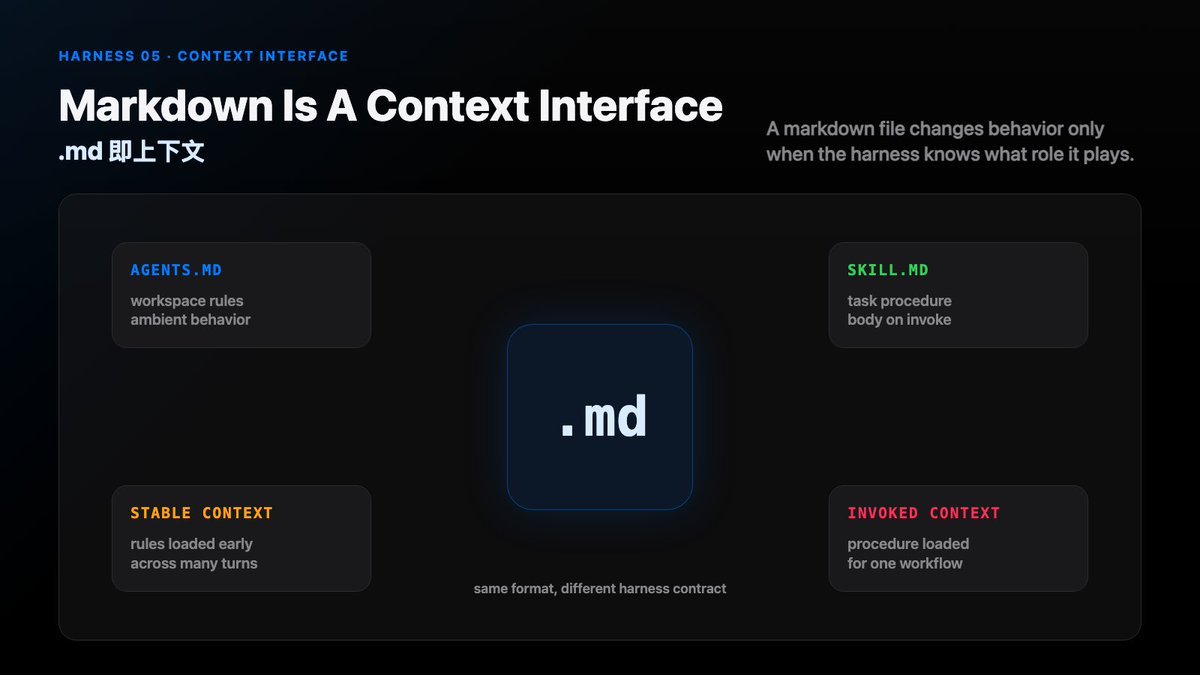
In modern coding agents, the interesting phenomenon is simple: ordinary markdown can change agent behavior.
The Naive Markdown Dump
A small agent may start with a naive design:
find every .md file paste all of them into the system prompt
That creates the illusion of context.
It also creates noise.
Not every markdown file has the same role.
README.md explains the project.
AGENTS.md gives operating instructions.
SKILL.md describes an invocable task procedure.
Design docs, meeting notes, changelogs, and scratch notes all have different lifetimes.
The harness needs to know the role before it decides where the markdown belongs.
Two Files, Two Jobs
AGENTS.md and SKILL.md are the clearest examples.
They both use Markdown.
They do not do the same job.
AGENTS.md is workspace instruction context.
It says: when working in this repo, behave like this.
SKILL.md is task procedure context.
It says: when this kind of task appears, use this workflow.
Same file format. Different harness role.
Why AGENTS.md Works
AGENTS.md works because the harness gives it a stable place in the turn.
It is discovered from the workspace.
It is scoped to the repo, directory, or subtree.
It is loaded before the model call.
It becomes part of the instruction context that shapes every action in that scope.
This is why a short file can matter so much.
It does not need to be persuasive. It needs to be reliably projected into the right context layer.
How AGENTS.md Works
A typical flow:
start in cwd resolve workspace read nearest AGENTS.md files merge instruction scopes add them to stable context build the model prompt
The model does not “search for rules” every turn.
The harness prepares the rules before the model sees the request.
That is the important part.
Where AGENTS.md enters the agent turn
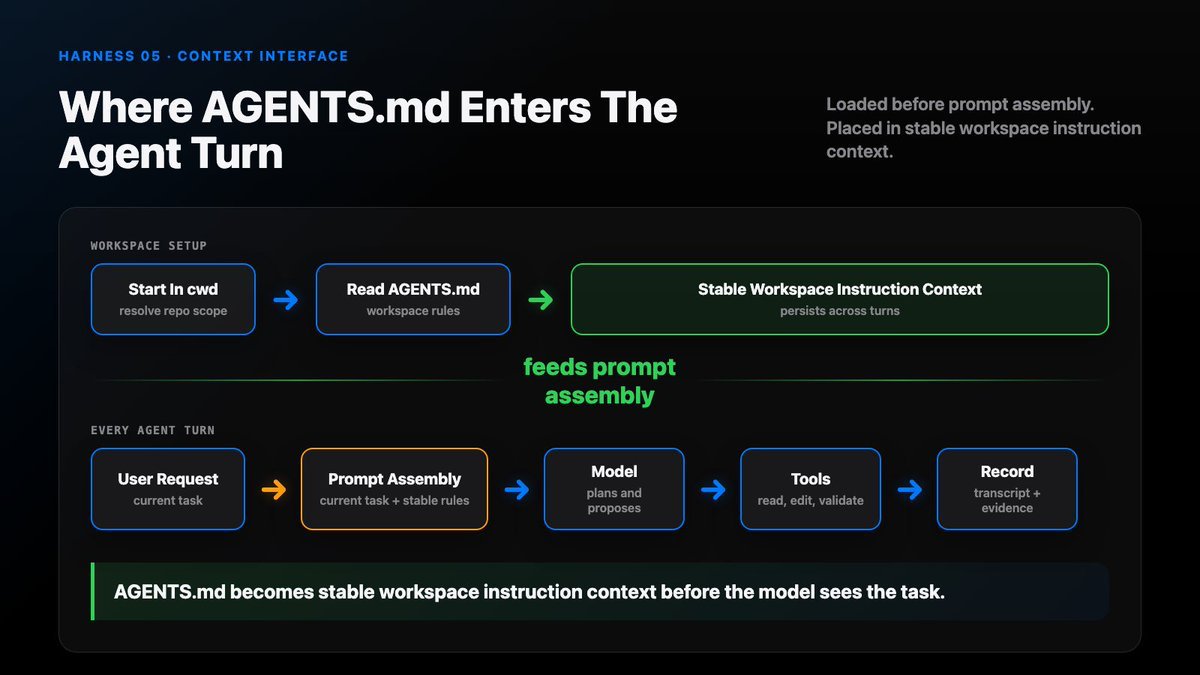
AGENTS.md loads before model-turn assembly.
It becomes stable workspace instruction context, next to project rules and local operating constraints.
The transcript records what happened. AGENTS.md shapes how the next action should happen.
Why SKILL.md Works
SKILL.md works for a different reason.
A skill should not dump all of its body into every prompt.
That would waste context.
Instead, a mature harness uses progressive disclosure.
First, the harness exposes cheap metadata:
name description when to use it
Only when the task needs the skill does the harness load the full body.
That is why a skill can sharply improve performance on a task.
It gives the agent a local operating manual exactly when it matters.
It can specify:
- which tools to use
- which files or APIs to inspect
- what order to follow
- what verification counts as done
- what output shape to produce
This is not “prompt magic.”
It is task-specific context routing.
How SKILL.md Works
A typical flow:
scan skill folders expose capability metadata match task or explicit invocation load SKILL.md body read referenced resources when needed apply workflow verify output
The important design is progressive disclosure.
Metadata stays cheap.
Procedure loads only when useful.
References load only when needed.
That keeps the base context small while still making the agent specialized at the right moment.
Where SKILL.md enters the agent turn
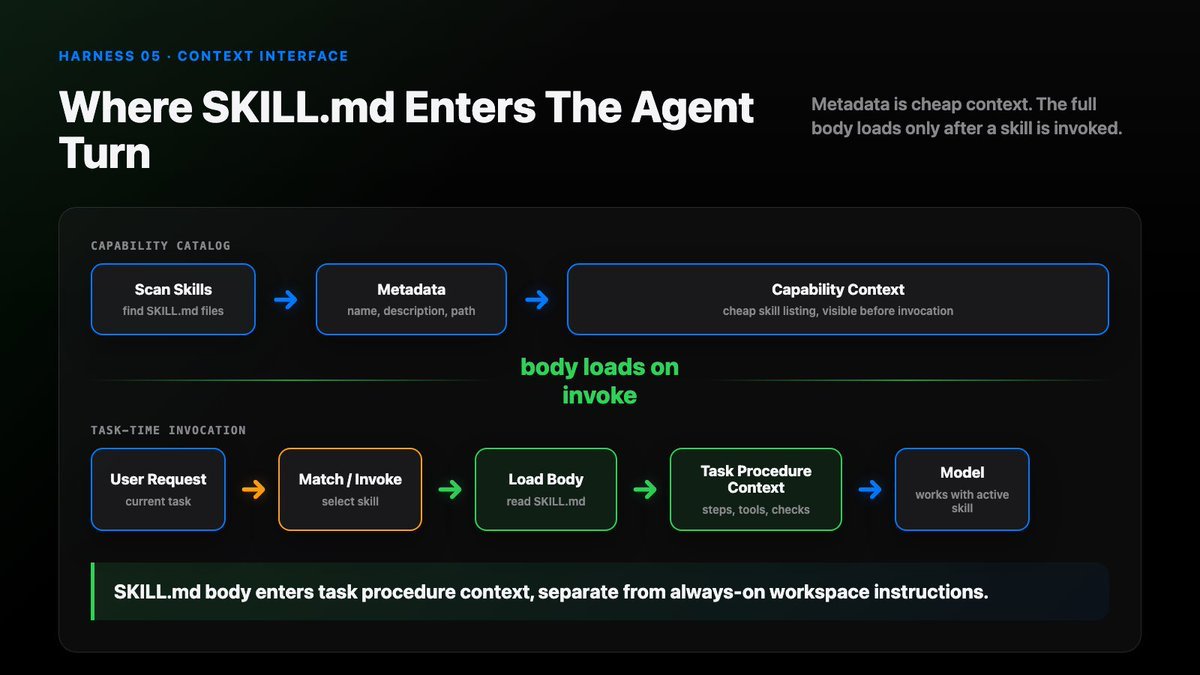
SKILL.md first appears as capability metadata. After task invocation, its body is loaded.
That body becomes procedural context for the current task, not permanent repo law.
06. Context Is A Projection
Every coding agent eventually meets the same problem: the session keeps getting longer.
The model has read files, run commands, searched logs, edited code, received validation output, and answered old questions.
The tempting solution is:
append everything
This feels like memory.
It is actually context flooding.
At first, the model seems smarter because it sees more. Then the same mechanism starts hurting it.
Old tool output competes with current evidence.
Huge shell logs bury the next instruction.
File reads that were true yesterday still look fresh today.
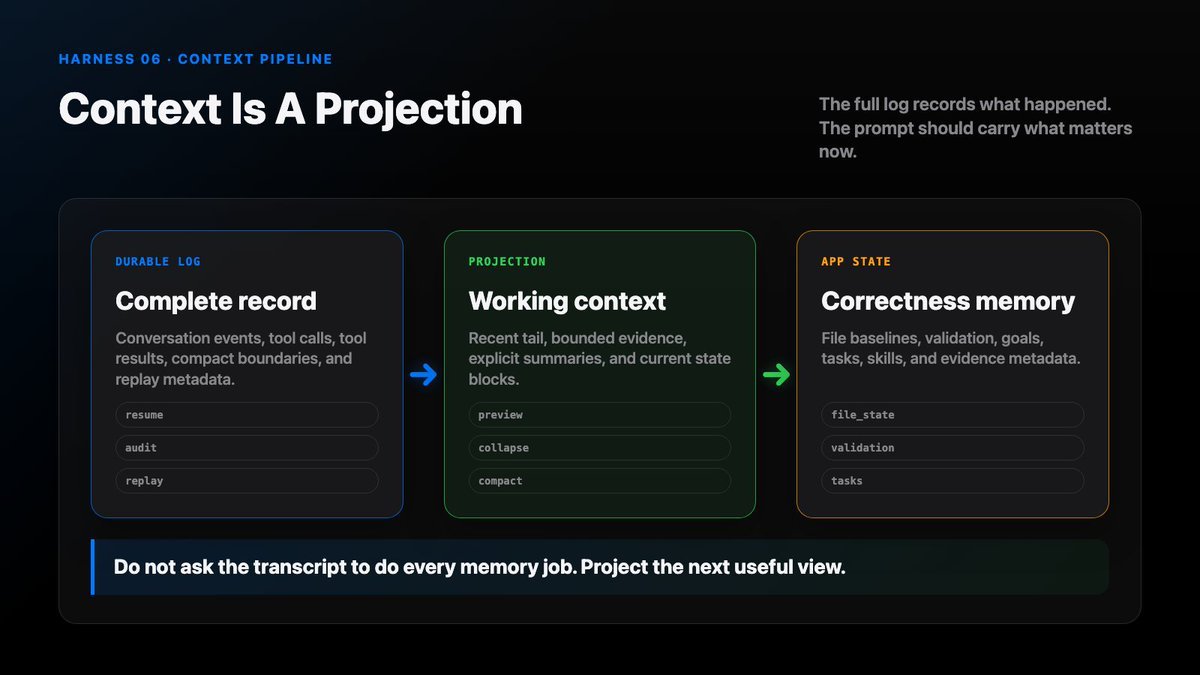
A transcript records what happened. Context decides what matters now.
The Naive Append Loop
The naive loop is:
prompt = old_prompt prompt += new_user_message prompt += assistant_message prompt += every_tool_result repeat
This fails because the transcript and the prompt have different jobs.
The transcript should be durable.
The prompt should be selective.
The full log is the source of truth. The model-visible context is a projection from that log.
The Multi-Turn Loop
A healthy multi-turn loop has phases:
1. App input 2. Context projection 3. Model call 4. Tools and evidence 5. Next-state commit
Context management happens before the model call.
The model does not receive “the session.” It receives a shaped view of the session.
The Core Split
A mature harness separates three things:
- durable log
- model-visible context
- app state
The durable log stores what happened.
Model-visible context is the bounded prompt for one call.
App state stores structured facts that should survive transcript reduction: files, goals, tasks, permissions, attachments, validation state, and evidence.
If these are mixed together, compaction becomes dangerous.
If they are separated, compaction becomes engineering.
Projection Happens Before The Model Call
The harness projection pipeline:
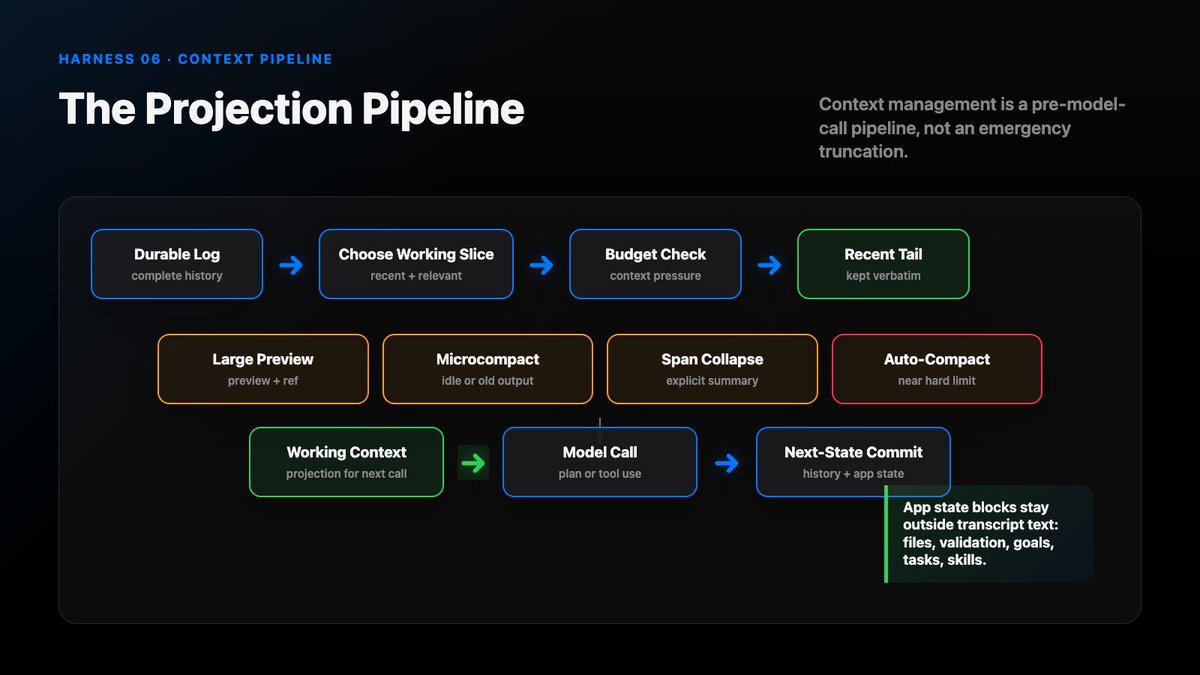
Start from the full session log. That is the source of truth.
Then select a working slice: recent turns, current user request, relevant files, active goals, and unresolved tool results.
Then check the context budget.
Then apply reduction moves.
Then attach state blocks that must survive transcript reduction.
Finally, build the model-visible prompt.
The result is not “all memory.” It is the current working view.
Four Projection Moves
Four useful context-management moves:
1. Large-result preview
Store the full result outside the prompt. Put only a bounded summary, counts, paths, and retrieval handle into context.
2. Idle-gap microcompact
If the user returns after a long idle gap, summarize the old span before continuing. Do not force the next turn to carry every stale detail.
3. Old-span collapse
Collapse old plans, attempts, and resolved errors into a compact state summary while preserving evidence and decisions.
4. Auto-compact near the limit
When the context window approaches the hard limit, compact before the model call fails.
Auto-Compact Near The Limit
A good implementation needs more than “if too long, summarize”.
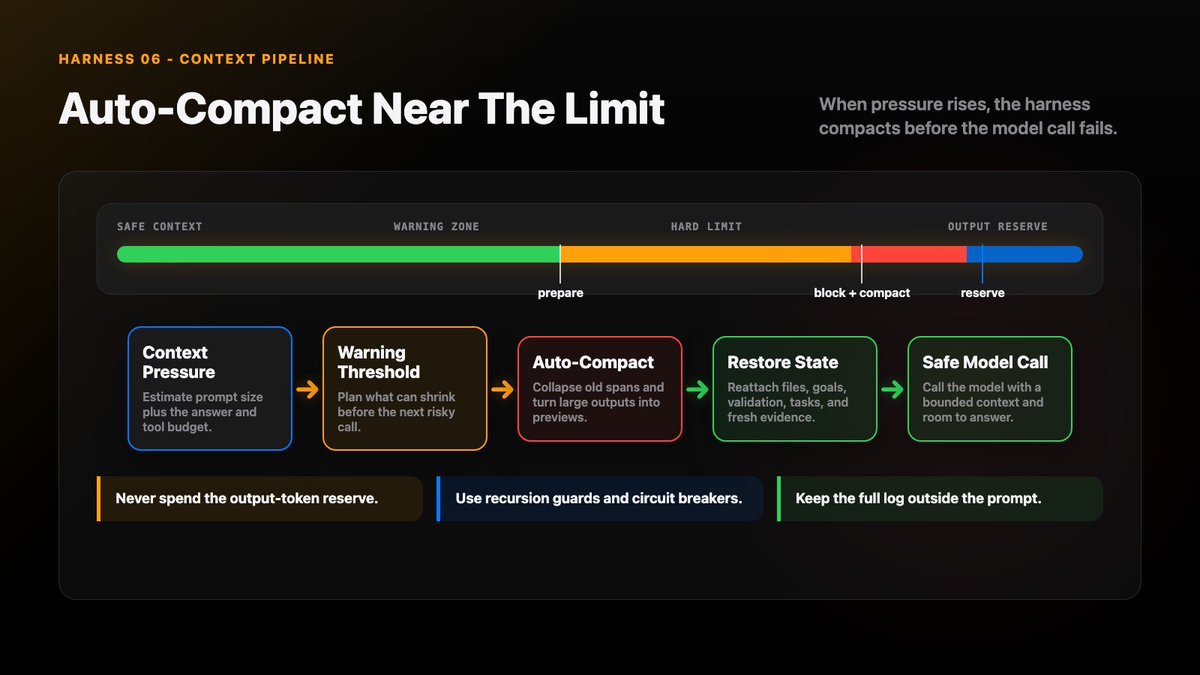
It needs:
- warning thresholds: tell the user roughly how much context remains
- hard blocking thresholds: stop before the prompt cannot fit
- output-token reserve: leave room for the model to answer
- recursion guards: avoid compaction triggering compaction forever
- failure circuit breakers: stop after repeated compact failures
- post-compact cleanup: remove obsolete transient state
- restored attachments or state blocks: bring back what the next turn still needs
The hard part is not summarizing. The hard part is preserving what future turns will need.
Memory Channels
Memory is stored state.
Context is the selected view for one model call.
They are related, but not the same thing.
Useful memory channels include:
- short-term working memory: what matters for the current task
- session memory: decisions and evidence from this session
- long-term memory: durable user or project preferences
- environment memory: refreshed facts from the real workspace
Projection is how these channels become prompt context.
07. A Subagent Opens A New Context
A subagent is a tool call that opens a new work context for the coding agent.
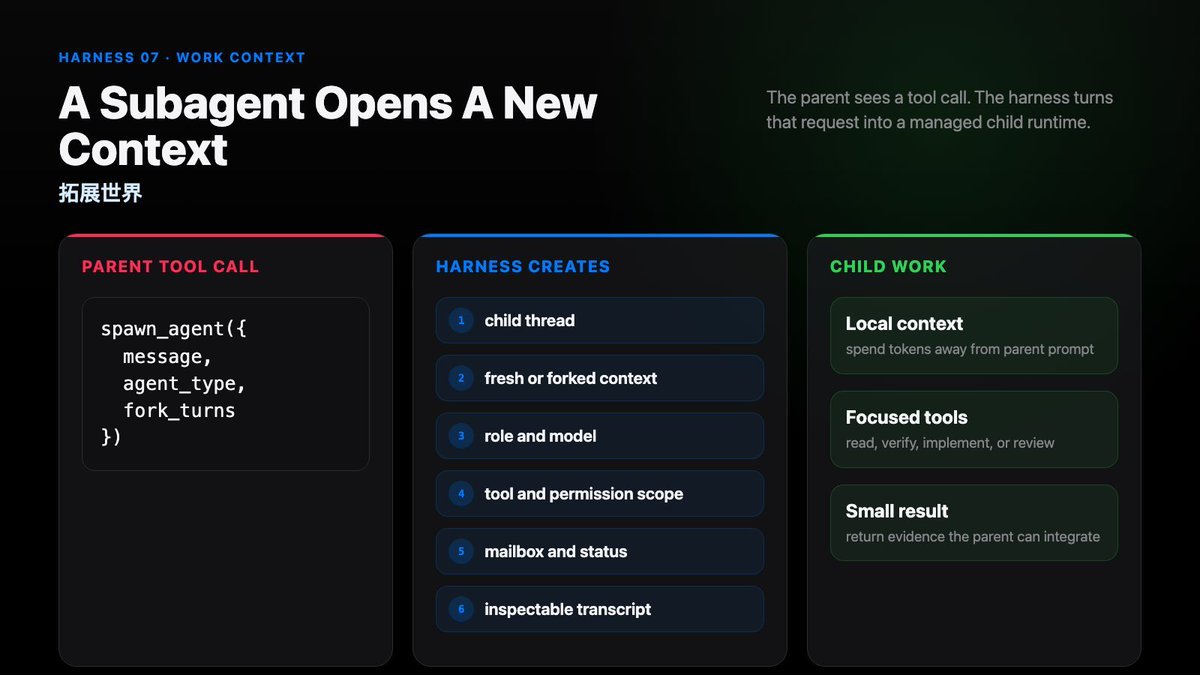
What happens when a subagent starts?
Short answer:
tool call outside, runtime inside
First: The Tool Call
Why say that subagent launch is a tool call?
Because at the parent model interface, it is one.
The user may ask naturally:
Use a verifier subagent to audit webhook retries.
Or the harness may expose a local command:
/delegate verifier audit webhook retries
But when the parent agent acts, it usually emits something like:
spawn_agent({ task_name, message, agent_type, fork_turns })
The parent tool call returns a child handle.
The parent can wait for it, send follow-up, list it, interrupt it, or read its projected result.
Then: Runtime
Tools are contracts. A subagent is another contract: a small interface backed by runtime state.
Once the tool call is accepted, the harness opens a child runtime.
That child runtime may have:
- its own thread or session
- its own transcript
- its own context projection
- a selected role or agent type
- selected tools and permissions
- shared resources such as cwd, repo, skills, AGENTS.md, plugins, or MCP servers
- a mailbox or handle for parent-child communication
Shared resources do not mean shared transcript.
The child has its own work context. The parent chooses how much context to project into it.
Session, Context, Subagent
These three words are easy to mix together.
Session is the runtime container:
thread, transcript, tools, permissions, resources, status, artifacts
Context is what one model call can see:
instructions, skills, AGENTS.md, recent turns, summaries, tool results, file state
Subagent is a child runtime under the parent session.
It can inherit resources, but it receives a selected context slice.
Tool Call Outside, Runtime Inside
The word subagent can be misleading.
It sounds like a smaller agent. In the harness, it is better understood as a managed child runtime.
The parent sees a tool interface.
The harness creates a child session underneath.
The child does not automatically share the full parent prompt.
The parent can launch a fresh child, a forked child, or a partial fork.
Fresh Agent, Forked Agent or Partial Fork?
The right context depends on the subagent pattern.
Fresh child:
- needs a full briefing
- should receive the goal, relevant files, what has already been tried, exact expected output, and answer depth
Forked child:
- inherits surrounding context
- should receive a direct next-step instruction
Partial fork:
- receives enough local memory to work
- avoids inheriting the full parent history as noise
Partial fork is often the most practical middle path.
When Subagents Help
Subagents are useful when the work is bounded and independent.
Examples:
- Parallelism: one child checks database migration, another checks frontend state, another runs verification.
- Role specialization: explorer, planner, verifier, worker, reviewer.
- Background work: long tests, large refactors, slow audits.
- Isolation: let a reviewer inspect evidence without polluting the parent context.
More agents do not guarantee better work.
More agents create more runtime state.
The harness must know who is working, what they know, what they changed, when they are done, and how their result becomes evidence.
Subagent workflow
A useful subagent workflow looks like this:
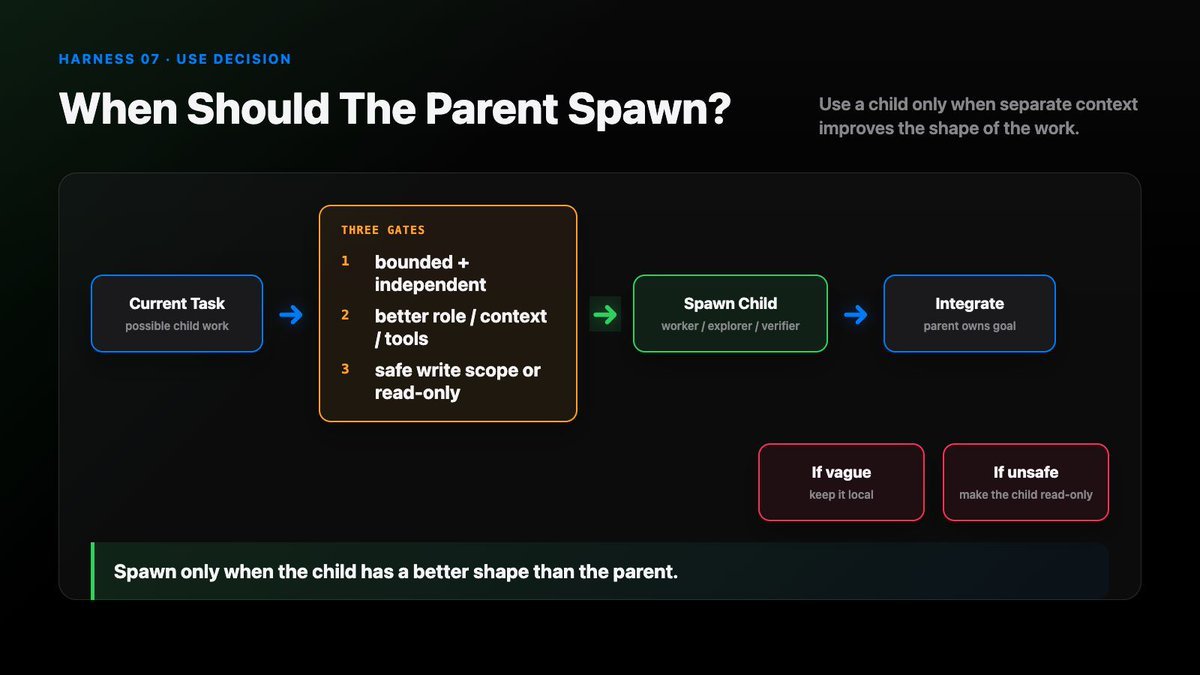
parent receives task decide whether delegation helps choose child role choose context slice choose tools and permissions spawn child runtime child works in its own transcript child returns compact evidence parent integrates result harness records lineage
Organizing multiple subagents is hard.
The clearer the role, context, and tool boundary, the better the result.
Subagents expand the world of a coding agent.
The harness decides whether that new world becomes clearer or more chaotic.